Body
What is Student View in Canvas?
The Student View in Canvas allows instructors to see what students see in their course, and even test submitting some items.
Note: When using student view, a Test Student account will be automatically created and you will see this Test Student account in your grade book.
The test student can be left in the course because submissions and scores for the Test Student do not affect course analytics, but Instructors can delete the Test Student if they would like to.
To Remove the Test Student from a Course
- Access the course and click on Settings.
- Click the Sections tab.

- Click on the name of the section to view the participants.
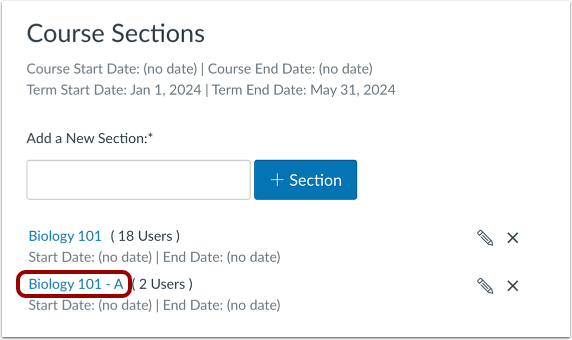
- Find the Test Student and click Remove user from section.

- Confirm deletion by clicking OK.
The Test Student will now be removed from your course. Repeat steps 1-5 for each course you want to remove the test student from.
NOTE: Each time you use the Student View, the Test Student will be recreated.
Resources
More information about the Student View and Removing the Test Student: